MultiCam EZ Router
Key Specifications
Max Spindle
Spindle Power
work area x
work area y
work area z
feed rate max
Overview
The MultiCam EZ Router is a production-focused CNC router platform designed to deliver straightforward, reliable cutting performance with a simplified setup and operation experience. The EZ Router targets shops that need industrial-grade output without the complexity of fully configurable production router systems — a machine that can be installed, trained on, and running production within days rather than weeks. It is particularly well suited to sign shops, small furniture operations, plastic fabricators, and educational or training environments that need a dependable daily-use router with a manageable learning curve.
Built on a welded steel frame, the EZ Router maintains the structural integrity that distinguishes MultiCam's lineup from import competitors. The gantry design provides consistent clearance across the full work envelope, and the machine's drive system delivers accurate, repeatable positioning suitable for production tolerances in wood, MDF, plastics, foam, and aluminum composites. The simplified interface is intentional — MultiCam designed the EZ Router to minimize the time between power-on and first cut, making it accessible to operators who are new to CNC routing or transitioning from manual fabrication workflows.
The EZ Router is offered in standard table configurations sized for 4x4 or 4x8-foot sheets, covering the most common sheet formats in sign making, display fabrication, and small-parts production. The machine's spindle options focus on the sweet spot for these applications — enough power and speed to cut cleanly through common materials without over-specifying for work that doesn't require heavy-duty capacity. Dust management is integrated with a standard dust foot, keeping the work area clean and reducing cleanup time between jobs.
MultiCam supports the EZ Router with the same domestic service network and application support that backs its higher-tier platforms. This means shops can get hands-on training from qualified MultiCam technicians, access US-based phone support, and order replacement parts without the delays associated with overseas sourcing. For a business owner investing in their first industrial CNC router, this support infrastructure is often as important as the machine's technical specifications.
The EZ Router competes in a segment that includes entry-level routers from ShopBot, Laguna Tools, and Camaster. Its advantage lies in MultiCam's manufacturing quality and support network, which provides a lower operational risk profile compared to lighter-duty alternatives. Shops that expect to grow into higher-production volumes can treat the EZ Router as a starting point within the MultiCam ecosystem, with the option to add machines from the 1000, 5000, or 7000 Series as throughput demands increase.
Full Specifications
| Parameter | Value |
|---|---|
| Work Area X | 49 in (1,245 mm) or 25 in (635 mm) depending on config |
| Work Area Y | 49 in (1,245 mm) to 97 in (2,464 mm) |
| Work Area Z | 5 in (127 mm) |
| Spindle Motor Power | 3–7.5 hp (2.2–5.6 kW) |
| Max Spindle Speed | 18,000 RPM |
| Feed Rate Max | 600 in/min (15.2 m/min) |
| CNC Control | MultiCam e-Panel (simplified interface) |
| Machine Weight | Approx. 1,200 lb (544 kg) |
| Maximum Storage Duration Session | Type: HTTP Cookie |
| Maximum Storage Duration 1 Year | Type: HTTP Cookie |
| Maximum Storage Duration Persistent | Type: HTML Local Storage |
| Maximum Storage Duration 2 Years | Type: HTTP Cookie |
| Maximum Storage Duration 1 Day | Type: HTTP Cookie |
| Maximum Storage Duration 3 Months | Type: HTTP Cookie |
| Maximum Storage Duration 180 Days | Type: HTTP Cookie |
| Manufacturer | Laguna |
| Model | SmartShop |
Specifications sourced from machinio.com — verified 2026-03-28
Strengths & Limitations
Strengths
- Simplified setup and operation ideal for first-time CNC router buyers
- Backed by MultiCam's US-based service and support network
- Industrial-grade welded steel frame for production reliability
- Competitive entry price for a domestically manufactured machine
- Clear upgrade path within the MultiCam product ecosystem
Limitations
- Limited Z-axis travel restricts 3D carving and thick-material applications
- Lower feed rate capacity compared to MultiCam's production-tier platforms
- Manual tool change only — no ATC option on base configuration
Best For
Frequently Asked Questions
01
The EZ Router prioritizes simplified operation and lower entry cost for shops new to CNC routing. The 1000 Series offers more configuration flexibility, higher feed rates, and greater scalability for shops that anticipate growing production volumes.
02
The EZ Router can cut aluminum composite panels (such as ACM/Alucobond) and thin sheet aluminum with appropriate tooling. It is not designed for heavy aluminum milling operations.
03
The EZ Router accepts standard G-code output from common CAM software packages including Vectric VCarve, Aspire, and other router-oriented CAM platforms. MultiCam provides application support to help new users get CAM workflows established.
04
Yes, MultiCam provides operator training through its dealer network. Training typically covers machine setup, software operation, tooling selection, and basic maintenance — critical support for businesses buying their first industrial CNC router.
05
The EZ Router is designed for relatively quick installation. Most shops can complete machine setup, software installation, and initial operator training within one to two days with support from a MultiCam dealer technician.
Videos

Wensco Sign Supply
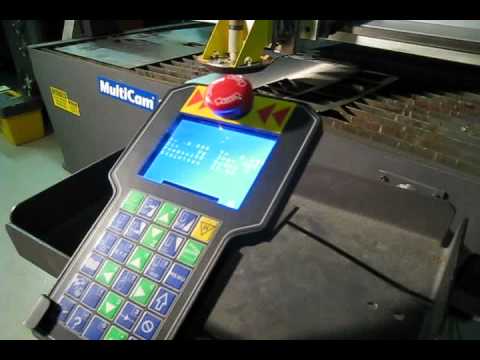
MultiCam CNC

Mikael Guthrie

Pro Tech Machinery
Community Discussions
Community discussion — For Sale: 2016 MultiCam 3000 Series CNC Router
Troubleshooting and problem-solving — EZ-Router waterjet table - Practical Machinist
Community discussion — MultiCam M103 3-Axis CNC Router - Practical Machinist
Community discussion — Fusion or Inventor CAM post for Multicam Apex router?
Electrical and installation requirements — Newbie MultiCam1000-series controller firmware & software
Community discussion — Need Help! Getting Multicam to use G code - CNCzone
Community discussion — Multicam Machines - CNCzone
Community discussion — Help with using multicam vision and enroute - CNCzone
Community discussion — What cam software are you using? : r/Machinists - Reddit
Community discussion — Can you use the same CAD software for different ... - Reddit
Community discussion — What CAM software do you use? : r/Machinists - Reddit
Community discussion — Bobcad and other comparable CAM programs? : r/Machinists - Reddit
Links to community discussions. Summaries are editorial — visit the original thread for full context.